ARC Raiders Best Settings Guide – Boost FPS, Display & Graphics Performance
Best ARC Raiders Settings
Optimize ARC Raiders for peak performance and smooth gameplay with these proven settings. This guide explains which graphics, display, and FPS tweaks truly boost your frame rate without ruining visuals. Whether you’re exploring Sparanza or fighting ARC units, the right setup keeps battles fluid and responsive while preserving the game’s cinematic feel. Let’s fine-tune your system for flawless raids and maximum FPS stability.
Learn About the Best ARC Raiders Settings
ARC Raiders rewards precision, awareness, and quick reactions, but none of that matters without stable performance. Lag and low FPS can turn even the best player into easy prey. That’s why tuning your settings properly is crucial.
In this complete ARC Raiders optimization guide, you’ll learn which graphics and display settings affect performance the most, how to gain extra FPS, and what system tweaks help you raid smoothly. These changes will boost responsiveness, improve aim accuracy, and make combat feel natural.
Forget stutter, delay, or screen tearing — after this setup, your ARC Raiders experience will look sharper and feel faster.

Best ARC Raiders Graphics Settings
ARC Raiders fills every fight with chaos — explosions, mechanical swarms, and particle-heavy lighting effects. These visuals can quickly drain GPU resources if you’re not careful. To balance stunning visuals and stable frame rates, start with this optimal setup:
Setting | Recommended Value |
|---|---|
Overall Quality Level | High |
View Distance | High |
Anti-Aliasing | High |
Shadows | High |
Post-Processing | High |
Texture | High |
Effects | High |
Reflections | High |
Foliage | High |
Global Illumination Resolution | High |
Motion Blur | Enabled |
Upscaled Resolution | 100% |
Resolution Scaling Method | AMD FSR3 |
AMD FSR3 Quality | Quality |
In-Game Performance Overlay | Disabled |
These settings preserve ARC Raiders’ gritty atmosphere and visual depth while maintaining excellent stability. If performance dips, lower reflections or post-processing first — they hit the GPU hardest.
For mid-range PCs, reducing texture or shadow quality helps a lot without ruining the look. Players using modern GPUs should find this configuration perfect for consistent 60–90 FPS in 2025.
Best ARC Raiders Settings for FPS
If smoothness matters more than visuals, it’s time to prioritize raw performance. Lowering heavy graphical effects frees up resources for higher frame rates — crucial during PvP encounters and large-scale battles. These are the most effective ARC Raiders FPS settings for competitive play:
Setting | Recommended Value |
|---|---|
Overall Quality Level | Low |
View Distance | Low |
Anti-Aliasing | Low |
Shadows | Low |
Post-Processing | Low |
Texture | Low |
Effects | Low |
Reflections | Low |
Foliage | Low |
Global Illumination Resolution | Low |
Motion Blur | Disabled |
Upscaled Resolution | 100% |
Resolution Scaling Method | AMD FSR3 |
AMD FSR3 Quality | Quality |
In-Game Performance Overlay | Disabled |
These settings strip away non-essential visuals while keeping gameplay fluid. Dropping shadows, reflections, and motion blur can instantly raise your FPS by 20–30%.
If you’re running a mid-tier rig, lock your frame rate to a stable number using the in-game limiter or GPU tools. Combine that with updated drivers and closed background apps for noticeably smoother raids.
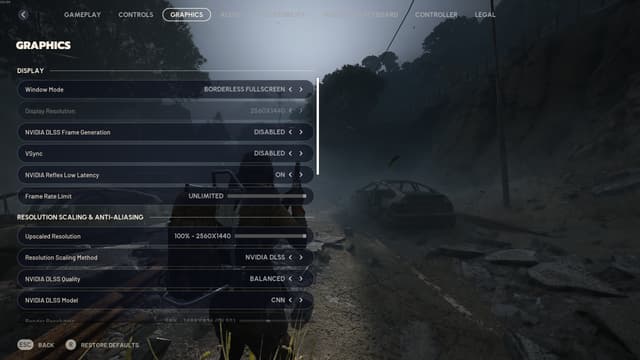
Best ARC Raiders Display Settings
Display configuration determines how crisp and reactive your screen feels. Correct settings eliminate screen tearing, reduce lag, and improve visibility — all vital when spotting loot or dodging incoming fire.
Setting | Recommended Value |
|---|---|
Display Mode | Fullscreen |
Refresh Rate | Match your monitor’s maximum |
Display Resolution | Native |
VSync | Disabled |
NVIDIA Reflex Low Latency | On |
Frame Rate Limit | Unlimited |
Field of View | 90–100 |
Brightness | Adjust until dark areas are visible but not overexposed |
Always run in Fullscreen Mode for minimal input delay. Disable VSync unless you experience severe tearing — it often increases latency. Setting Field of View around 95 gives balanced spatial awareness, while NVIDIA Reflex minimizes input lag during firefights.
Together, these tweaks ensure a responsive display that enhances precision and reaction speed, especially in fast-paced raids or PvP skirmishes.
How to Increase FPS in ARC Raiders
Boosting FPS isn’t just about graphics—it’s about system efficiency. A few targeted adjustments can transform performance and responsiveness, especially during crowded raids. Below are tested methods to enhance frame stability in ARC Raiders:
Method | What It Does | FPS Impact |
|---|---|---|
Reduce Visual Quality Preset | Lowers GPU load by simplifying effects | High |
Turn Off Bloom and Lens Flares | Reduces screen clutter and strain | Medium |
Lower Shadow Quality | Keeps definition while saving resources | Medium |
Disable Screen Space Reflections | Removes real-time reflections | High |
Use Exclusive Fullscreen | Prevents performance drops from background apps | Low |
Activate Low Latency Mode (GPU) | Reduces input delay | Low |
Shut Down Unused Apps | Frees CPU and memory | Medium |
Keep GPU Software Up to Date | Gains stability from driver fixes | Low |
Remove FPS Cap | Allows higher output potential | Medium |
Skip V-Sync | Cuts input lag, minor tearing possible | High |
Start by dropping overall quality presets and reflections — the biggest FPS gainers. Keeping textures at Medium maintains decent visuals without tanking performance. Ensure your GPU and Windows updates are current, as patch optimizations often add 5–10 extra frames.
Even small tweaks like lowering shadows or disabling post-processing effects can significantly smooth the experience. Higher FPS means quicker reaction times and sharper aim, giving you a competitive edge during extractions.
ARC Raiders System Requirements
ARC Raiders demands both graphical power and memory bandwidth due to its massive environments and real-time physics. Meeting the right system requirements ensures fluid performance and fewer drops.
Minimum Requirements (for stable low settings):
OS: Windows 10 or later (64-bit)
Processor: Intel Core i5-6600K or AMD Ryzen 5 1600
Memory: 12 GB RAM
Graphics: NVIDIA GeForce GTX 1050 Ti / AMD Radeon RX 580 / Intel Arc A380
DirectX: Version 12
Recommended Requirements (for smooth, detailed gameplay):
OS: Windows 10 or later (64-bit)
Processor: Intel Core i5-9600K or AMD Ryzen 5 3600
Memory: 16 GB RAM
Graphics: NVIDIA GeForce RTX 2070 / AMD Radeon RX 5700 XT / Intel Arc B570
DirectX: Version 12
If your target is consistent 60 FPS or higher, lower post-processing and reflection quality first. Unreal Engine’s lighting system is GPU-intensive, so trimming visual bloom helps more than cutting texture detail.
Conclusion
That wraps up the ultimate ARC Raiders optimization guide. With the right settings, you’ll enjoy smoother performance, quicker responses, and clearer visuals across every battlefield.
Small tweaks—like switching to Fullscreen, disabling VSync, or using AMD FSR3—deliver major results. Combine these adjustments with updated drivers and smart hardware management, and every firefight becomes sharper, faster, and far more stable.
Now your system is fully tuned—time to dive back into Sparanza and dominate those ARC machines with flawless precision and buttery-smooth FPS.
F.A.Q.
What are the best settings for ARC Raiders?
The ideal balance combines High-to-Medium graphics with Fullscreen Mode enabled and VSync turned off. Use AMD FSR3 for smoother scaling without visible quality loss.
How much FPS is considered good in ARC Raiders?
A stable 60–90 FPS delivers excellent smoothness for both PvE and PvP gameplay. Higher rates are beneficial but not mandatory unless you’re aiming for competitive-level precision.
How can I make ARC Raiders run better?
Lower demanding options like Shadows and Reflections, disable unnecessary post-processing, and ensure your GPU drivers are fully updated. Closing background software often yields a noticeable improvement.
Is 60 FPS enough for ARC Raiders?
Yes. 60 FPS provides solid responsiveness and visual clarity. However, players using high-refresh monitors (120Hz+) will benefit from pushing FPS even higher.
Is ARC Raiders optimized well?
Overall, yes — the game runs efficiently on modern hardware, though large battles and dynamic effects can still strain mid-range PCs. Adjusting lighting and texture quality fixes most stutters.
What’s the average FPS most systems achieve?
On balanced settings, mid-tier PCs typically reach 60–75 FPS, while higher-end rigs maintain over 100 FPS consistently after optimization.