FC 27 Best Settings: Camera, Controls and a Useful Baseline
Good FC 27 settings help you read a situation and reproduce the action you intended. They do not fix a decision to pass into a blocked lane or guarantee a difficult finish. Begin with a specific problem: what are you unable to see or perform consistently?
A useful baseline has three parts: a readable camera, a control setup you understand and helpful information on screen. Sensitivity and assistance can follow. Copying every value at once makes adaptation harder because the view and the behaviour of your inputs change together.
The following is an editorial starting point for FC 27, primarily for regular 11v11 matches. Selectable values depend on the mode and device. When a competitive mode fixes a setting, an offline alternative should not be treated as a hidden advantage you can reproduce online.
Separate a setting problem from a playing problem
Record one observable symptom. Saying that defending feels poor is too broad. Saying that you cannot see an unmarked opponent when the ball switches to the far side already points toward a useful test. Review the view before changing every defensive setting.
If a pass goes to the wrong teammate, consider directional input, receiver selection and the habit of turning before passing. Extra assistance may hide an error temporarily without explaining it. A useful configuration should make the action easier to understand.
Keep a record of the original setup so you can return to it. If an experiment does not help, undo it without rebuilding the old configuration from memory. Neither one excellent attack nor one conceded goal establishes whether the entire setup works.
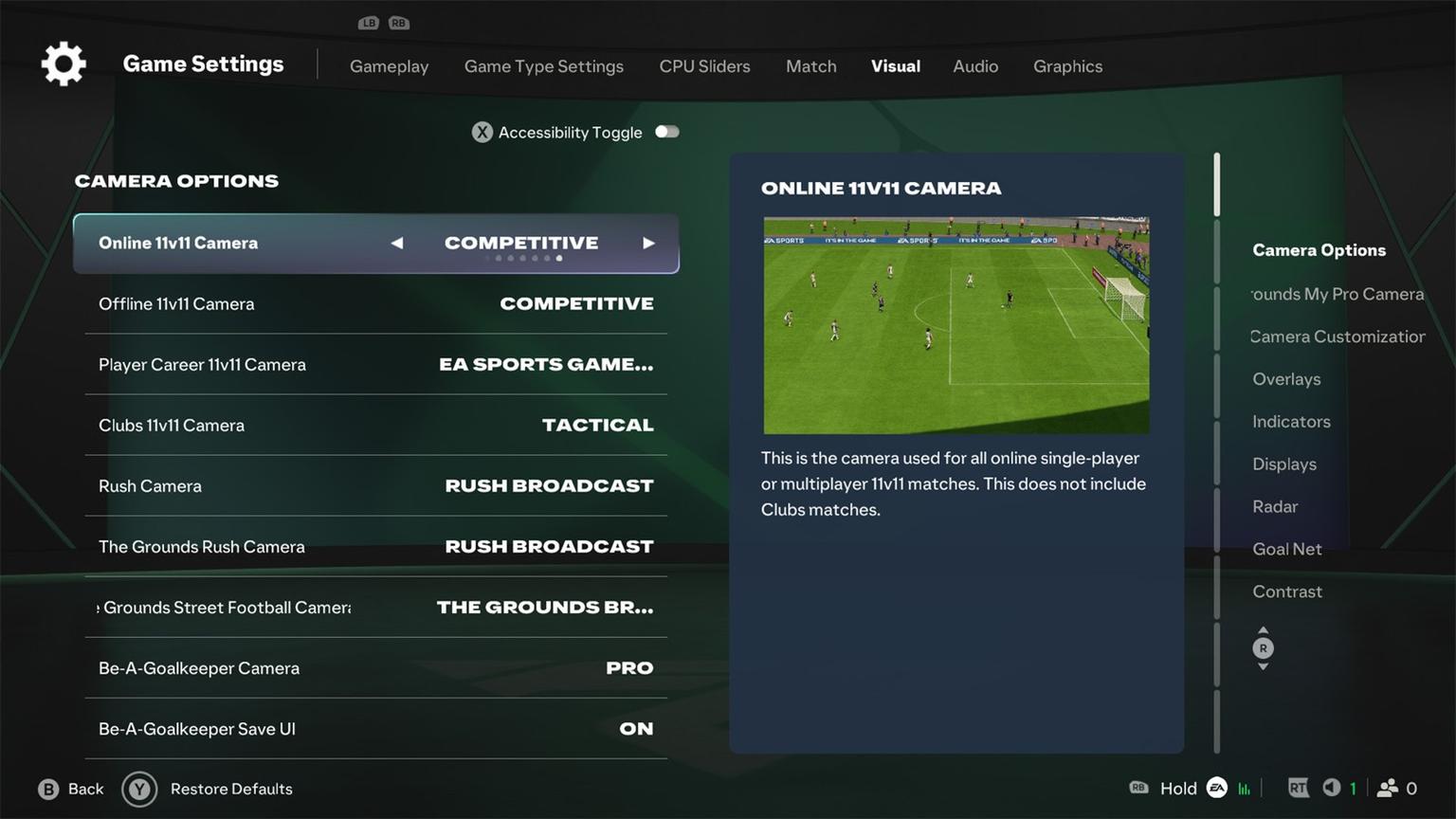
Online 11v11, Career, Clubs and Rush use separate camera entries in the menu.
Camera: start with a readable pitch
Try Co-Op for a broad view. If players become too small on your display and judging distance to the ball becomes difficult, compare Tele Broadcast. Choose by whether you can see the nearby defender and the next passing option, not by the popularity of the name.
For a wide-view experiment, start with Height 20 and Zoom 0. This is an editorial trial within the available controls, not a compulsory professional standard. If individual players are difficult to distinguish, add zoom or reduce height gradually.
Test several typical situations: playing out, switching the ball, receiving around the box and recovering after losing possession. A camera that works in one area but makes you guess in another still needs adjustment. An attractive panoramic view does not automatically make control comfortable.
FC 27 separates cameras by format. A choice made for 11v11 does not automatically become the best option for Rush, goalkeeping or The Grounds. Begin with your most-used mode and assess the others independently.
A practical baseline to test
Setting | Starting experiment | What to assess |
|---|---|---|
11v11 camera | Co-Op, compared with Tele Broadcast | Can you read the next option and the nearby opponent? |
Height / Zoom | 20 / 0 as an experiment | Are individual players still easy to distinguish? |
Shot Assistance | Assisted for the initial stage | Is aiming deliberate and repeatable? |
Right Stick Switching | Classic as an understandable base | Can you select the intended defender without correcting? |
Next Player Switch Indicator | On | Can you anticipate the next selection? |
Simplified Skill Moves | Choose for the learning goal | Do you want contextual actions or a particular move? |
Power Shot Zoom | Compare On and Off | Does the camera change disrupt your reading of play? |
The table is not a mandatory checklist of changes. Keep an established alternative if you understand its behaviour and it works. A new value is useful when it addresses a problem, not merely when it matches someone else's screenshot.
Shooting: choose assistance for control
Start with Assisted if aiming is inconsistent and pay attention to the player's preparation. Compare Precision separately once you can direct shots deliberately. A more demanding option is useful when you can exploit that control, not because a difficult-sounding label improves results.
Repeat similar situations: the same side, a comparable distance and a suitable player. Assess whether the direction matches the intention, not just whether the attempt scores. A goal following accidental input does not prove that the setting is mastered.
Separate aim from timing when reviewing errors. Shooting under immediate pressure and shooting after preparation are different tests. Changing both conditions makes the conclusion about assistance unreliable.
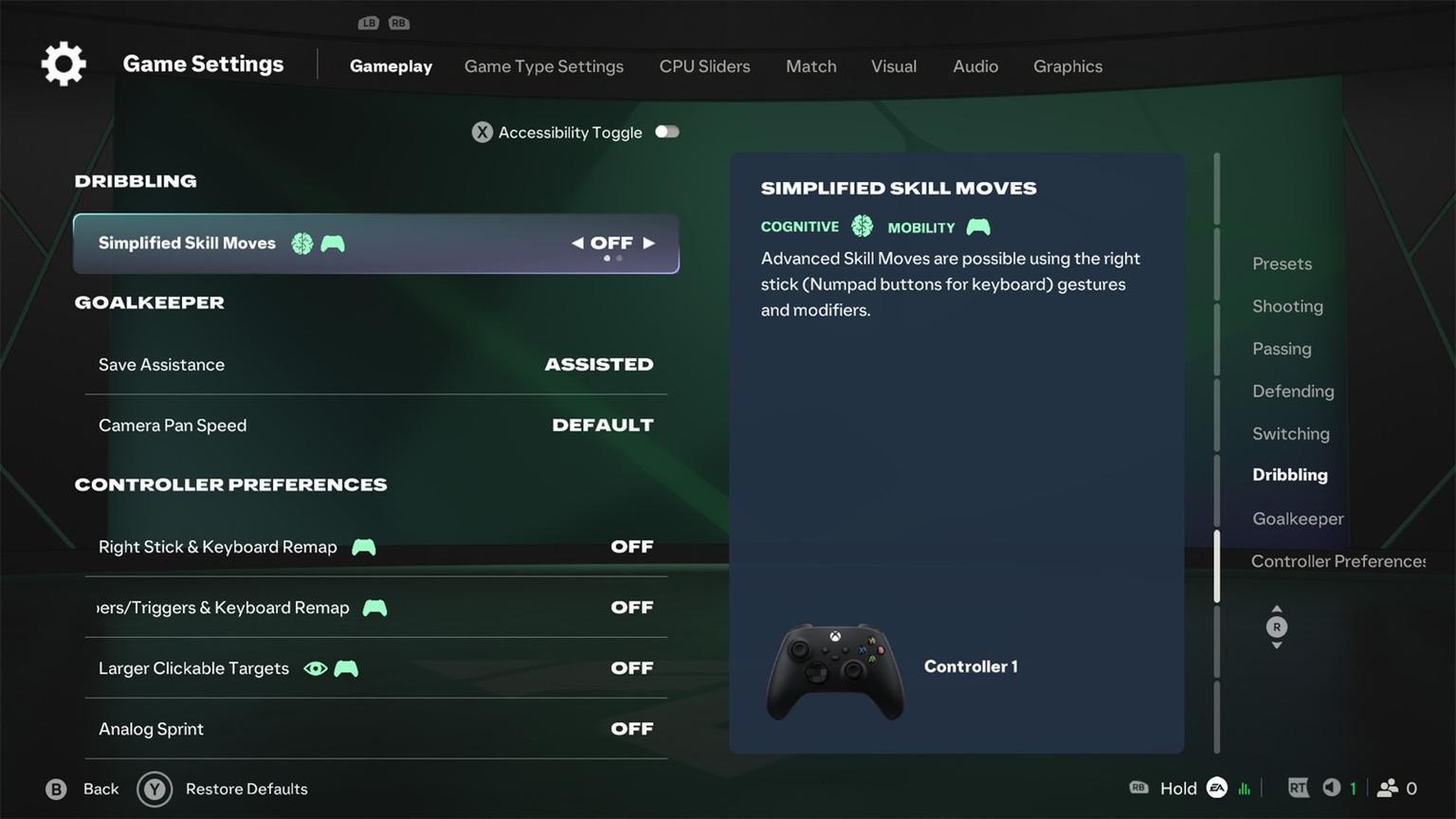
Check Simplified Skill Moves before practising skills. The option is off in this example.
Switching: build a stable reference
Begin with a system you understand and check whether you can predict the selected player. Do not change sensitivity after every mistake. First ensure that you interpret the directional reference consistently rather than expecting one movement to select players in unrelated areas.
A useful drill is to handle several lateral switches by the opposition. The first goal is selecting a defender early enough to preserve the line, not immediately winning possession. Add pressure and tackling once selection becomes dependable.
If the selected player continues moving in the wrong direction, review the switching moment. Sometimes you transferred control too late. Identify a repeated error and test one related setting rather than assuming that another value solves the whole defensive problem.
In Classic, flicking the right stick selects the nearest player in that direction. Start with Reference - Player Relative, which uses the controlled player as its reference; Ball Relative uses the ball. Check this distinction before changing sensitivity. Auto Switching Move Assistance - None removes the added continuation of the previous movement after an automatic switch; Low and High retain it briefly. Test one option in a familiar situation.
Visibility and accessibility
Keep information that supports the next decision. A clear selected-player marker and distinguishable team colours can matter more than an uncluttered appearance. Equally, a persistent animation or prompt may distract you personally.
Contrast, colour and accessibility options should reflect your perception. There is no universal requirement to disable them for competition. Check whether the ball, kits and indicators remain readable on different parts of the pitch.
Treat connection and image stability separately from tactics. If a problem appears only online, comparison with training can help establish whether controls are the right place to investigate. Changing the camera does not repair missing network data.
A testing routine for one session
Select one mode and a familiar squad.
Adjust the view without changing controls at the same time.
Test passing, receiving and switching in repeatable situations.
Change one setting linked to the error you observed.
Compare several situations, then keep or undo the change.
Return to fine-tuning when you can explain the remaining problem.
FAQ
What is the best FC 27 camera?
Co-Op is worth trying for an overview, while Tele Broadcast offers a closer picture. The best choice lets you read the pitch and control the immediate situation on your display.
Must I use Height 20 and Zoom 0?
No. That combination tests a wide picture. Adjust it gradually if players are difficult to distinguish.
Should Simplified Skill Moves be disabled?
Direct control suits practising a particular input. Contextual moves can be useful when easier execution is the goal. Select according to what you are trying to learn.
Will a new setup immediately improve results?
Not necessarily. You need time to adapt. Judge consistency of intended actions rather than the score of a single match.