The First Descendant Modules Guide: Capacity and Sockets
Modules determine how a build functions in The First Descendant. They increase stats, help manage resources and change particular skills. Two players using the same character and similar weapons can therefore differ substantially in damage and survival. The number of installed cards alone does not measure the quality of the setup.
The main restriction is Module Capacity. Each card consumes part of the budget, and enhancement usually increases its cost. Matching sockets help save capacity, an Energy Activator increases the limit, and a Crystallization Catalyst lets you customize a socket. These tools solve different problems and should be chosen accordingly.
This guide follows the process from early enhancements to planning multiple loadouts. Start with the effect you need for a particular activity, then check compatibility and cost. That order helps prevent expensive upgrades from leaving you with a collection of useful cards that cannot fit together.
Module categories explained
Category | What it changes | What to inspect |
|---|---|---|
Descendant Modules | Character stats and skill performance | Relevant stats, compatibility groups, Attribute and Arche Type |
Weapon Modules | Gunplay and weapon performance | Ammunition family and usefulness for that gun |
Transcendent Skill Module | A particular Descendant's skills | Normal or Ultimate character compatibility |
Sub Module | An additional mechanic and available capacity | The effect and its enhancement outcome |
Trigger and Ancestors Modules | Additional late-game build development | Unlocks, activation conditions and suitable options |
Rarity should not make the decision for you. A basic card supplying a necessary stat can matter more than a rare effect that barely activates in your rotation. Do not automatically apply firearm bonuses to skill damage either. Firearm ATK, Skill Power and Skill Power Modifier affect different parts of a build.
Read the whole card
Check four things first: effect description, enhancement level, capacity cost and socket type. Then inspect its group and equipment restrictions. If the interface prevents two cards from being installed together, read the reason before changing unrelated parts of the loadout.
A displayed bonus may affect only particular skills or conditions. Range matters when it expands the effect you need; duration matters when it extends an important buff or damage effect. A stat that appears appropriate for the character does not necessarily improve the button around which the build is organized.
Compare the resulting build stats, not one attractive line. An increase can come with a penalty elsewhere. Extra damage contributes little if the tradeoff leaves insufficient MP for a full cycle or makes the key cooldown miss the next enemy wave.
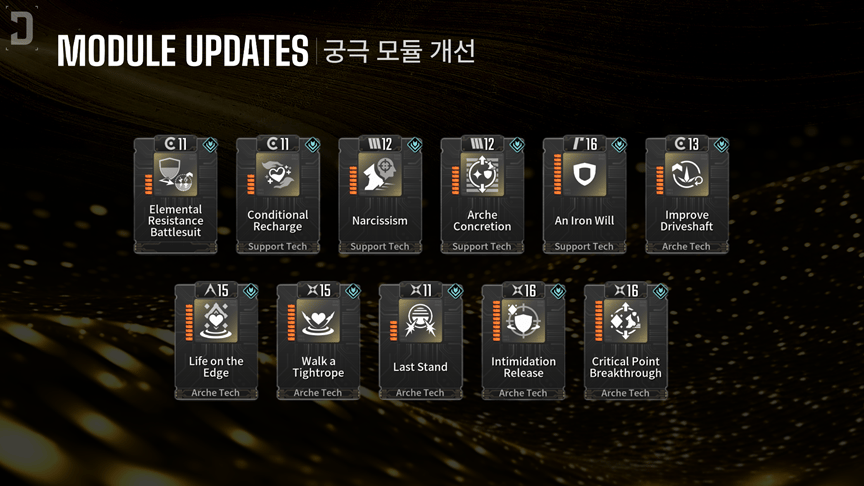
A card communicates more than an effect: group, socket type and capacity cost matter.
A useful enhancement order
Establish survival through the HP and defensive stats you need.
Improve your main source of damage, whether a weapon or selected skills.
Address resource shortages, excessive cooldowns or inadequate range.
Test the result in the activity the build is intended to clear.
Spend on specialized additional effects after the core works.
Early on, developing a few important cards is often more useful than spreading enhancements across your entire inventory. When choosing between another arbitrary module and improving an existing core card, compare their actual contribution rather than the number of occupied slots.
Silion in Albion handles enhancement. It uses Gold and Kuiper Shards, so inspect both the next upgrade's price and the resulting capacity cost. One optional improvement should not leave you unable to enhance a defensive card that the build needs to function.
A simple capacity example
Imagine a hypothetical build with a limit of 60 and 54 already used. That leaves 6. A card costing 12 cannot fit merely because a physical socket is empty. You must reduce existing costs, increase the limit or change the loadout. These numbers illustrate budgeting rather than prescribe the capacity your account should have.
Free sockets and free capacity are different resources. Plan around the final cost of enhanced cards instead of using only their current level-one cost. Otherwise, improving a module can force you to remove another part of the setup.
Special cards have important exceptions. Enhancing Descendant Skill Modules reduces their capacity cost. Enhancing Sub Modules increases maximum available capacity. Do not apply the ordinary-module cost rule to these two categories.
Energy Activators and Crystallization Catalysts
An Energy Activator raises the limit
An Activator increases the maximum Module Capacity of a specific Descendant or weapon. It is a one-time expansion for that object. Confirm the target's identity and make sure it is the character version or weapon you actually intend to develop.
A Crystallization Catalyst customizes a socket
A Catalyst assigns a type to a slot. Normal assignment requires Descendant Level 40 or Weapon Proficiency 40. The process resets the relevant level or Proficiency to 1, while character skills remain available. Plan another leveling pass before taking the reset character into demanding content.
Matching the card's type with the socket halves its capacity cost: the hypothetical 12-cost card would use 6 and fit the remaining budget. A mismatch can make placement less efficient. Inspect the cost displayed in the actual slot, especially when moving modules between different loadouts.
Assign sockets for a tested set rather than the first card you find. If bossing and farming need different loadouts, compare both layouts before committing resources. Identify the modules they share, then begin expensive specialization with slots unlikely to require an immediate change.
After changing a socket, save the layout and inspect the resulting stats again. This catches a removed card or an unexpected restriction before combat, when correcting it is easier.
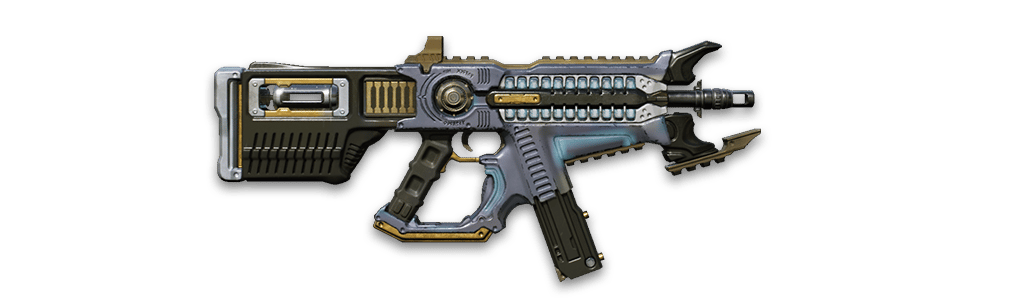
Thunder Cage: inspect weapon level, modules and Unique Ability separately.
How to find a missing module
Open the card in the Library and inspect Acquisition Info. Check the available source, required difficulty and reward conditions. An operation's completion reward should not be confused with a possible drop from one of its enemies.
For basic cards, check Silion's Archive Shard shop added in update 1.4.3. It sells Normal, Rare and Ultimate Modules; Transcendent, Trigger and Ancestors Modules are excluded. Check the available card and purchase limit before farming. For a specific Transcendent module, verify its exact name and compatible character versions.
Dismantling and combining duplicates
Dismantling supplies enhancement materials. Combining consumes four selected modules to produce one new result. It does not guarantee the particular card you want, so it is not a precise substitute for an identified farming source with clear reward conditions.
Protect important copies before using bulk operations. You may want differently enhanced versions of the same card for two capacity budgets. Duplicate filters help identify candidates, but the decision to dismantle should still account for your active and planned loadouts.
Frequently asked questions
Should I fill every socket immediately?
No. Establish useful stats and a reliable combat cycle first. An empty slot is preferable to an arbitrary card that prevents the important upgrades from fitting.
Is every red module mandatory?
No. A skill module can change the combat style. Choose it for a purpose, then adjust the rest of the build around the resulting skills.
Why am I weaker after using a Catalyst?
Your level was reset. Re-level the character and confirm that the assigned socket actually benefits the installed module layout.
Can I copy a build without checking it?
Use it as a starting point. Compare character version, enhancement levels, reactor, available capacity and effect conditions with your own account.